Performance against Kind2
How intrepyd compares to Kind2, the
reference model checker for Lustre, on the Kind2 benchmark set, with a 30
second timeout. The comparison is run with the benchmark harness
(benchmarks/harness.py); this page describes the method and the two plots it
produces, and gives the exact commands so the numbers can be regenerated.
Method
- Same machine, same budget. Every tool runs on the same machine, each run
in its own process, with a 30 s timeout and a memory cap, and each tool gets
the same number of cores — a single engine one core, a portfolio (intrepyd's
or Kind2's) the same
--portfolio-cpus. - Same semantics. Kind2 reads Lustre
intas unbounded integers, so the comparison uses--int-type int; the 32-bit encoding (int32) is reported apart. Only benchmarks on which the two tools agree on the verdict are compared for speed; disagreements are bugs and are reported separately. - What is compared. intrepyd's portfolio against Kind2's default portfolio, and engine by engine (BMC, k-induction, IC3) against the matching Kind2 engine.
Results
The run below is on the 848-benchmark Kind2 set, with Kind2 3.0.0 (and the z3
5.0.0 it ships with), unbounded int semantics, a 30 s timeout, on a 16-core
machine. It compares intrepyd's portfolio against Kind2's default portfolio.
| Tool | Solved (of 848) | Valid | Invalid | Timed out | Errored |
|---|---|---|---|---|---|
| intrepyd portfolio | 823 | 471 | 352 | 25 | 0 |
| Kind2 portfolio | 798 | 453 | 345 | 48 | 2 |
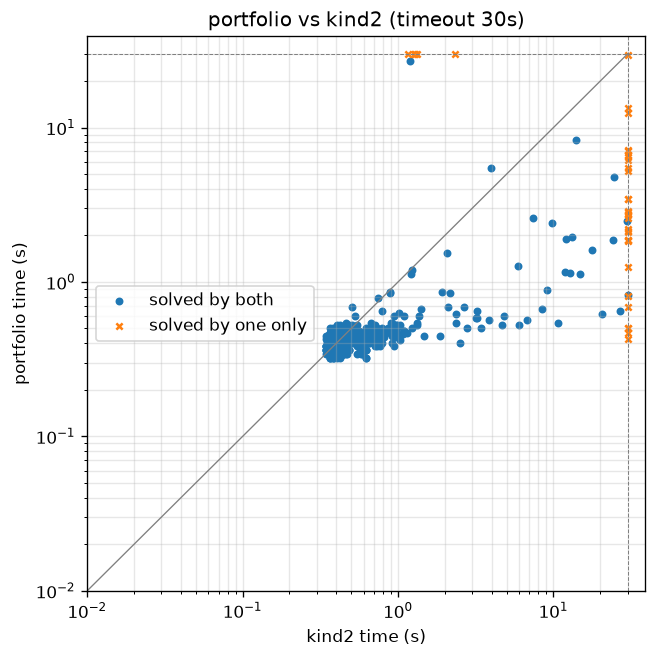
On every one of the 793 benchmarks both tools solve within the budget they return the same verdict — there are no disagreements, the soundness check that matters most. Of the rest, 30 are solved only by intrepyd and 5 only by Kind2.
Scatter plot
One point per benchmark, Kind2's time on the x axis and intrepyd's on the y axis, log-log, with the timeout as the border. A point below the diagonal is a benchmark intrepyd solves faster; a point on a border line is one only that tool solved within the budget.
Benchmarks solved over time
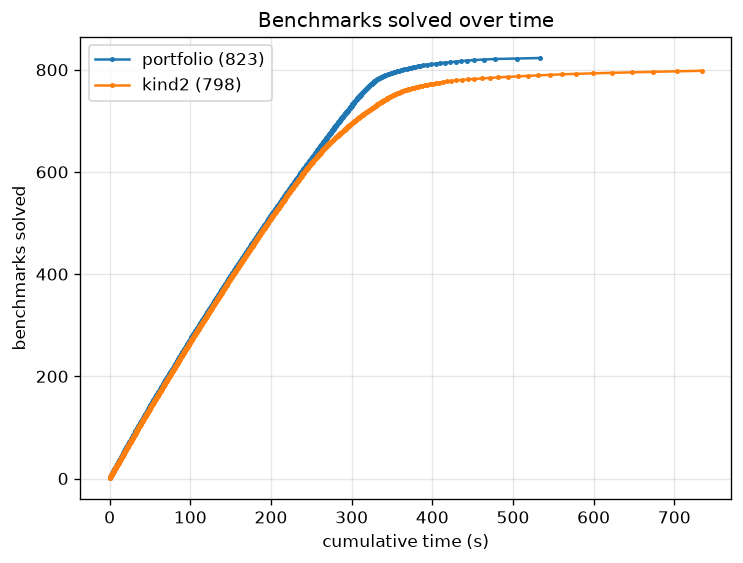
A cactus plot: the number of benchmarks solved against cumulative time, one curve per tool. A curve that reaches higher solves more within the budget; a curve further left is faster.
Reading
- intrepyd solves more within the budget — 823 against 798 — and times out on half as many benchmarks (25 against 48). It also clears its set in less total time (534 s against 734 s).
- The two never disagree. Across the 793 both solve, every verdict matches.
- Where each one wins alone. The 30 that only intrepyd solves are
invariant-heavy problems (the
memory1/DRAGON,simulationandlargefamilies) on which Kind2's portfolio times out; the 5 that only Kind2 solves are all inlarge/microwave. - On the common ground they are close. Of the 793 both solve, intrepyd is faster on 431 and Kind2 on 362 — a small edge to intrepyd, decided benchmark by benchmark rather than across the board.
Regenerating the numbers
# 1. Run both tools on the benchmarks with a 30 s timeout (needs Kind2 and the
#    z3 it uses; this takes a while)
python benchmarks/harness.py run results-int.jsonl \
    --tools portfolio,bmc,kind,pdr,kind2,kind2_bmc,kind2_kind,kind2_ic3 \
    --int-type int --timeout 30 --kind2 /path/to/kind2 --z3 /path/to/z3

# 2. Check the two tools agree where they both answer
python benchmarks/harness.py report results-int.jsonl --expected benchmarks/kind2-benchmarks.txt

# 3. Produce the plots
python benchmarks/harness.py plot results-int.jsonl \
    --pair portfolio,kind2 --out-dir docs/assets/benchmarks
Step 3 writes scatter.png and cactus.png. The run is machine-dependent, so
the plots shown above are produced on the reference benchmarking machine and
committed under docs/assets/benchmarks/; re-running the three steps there
refreshes the numbers and the plots on this page.
See also the benchmarking guide for running a single benchmark, and model checking for the engines themselves.